Know what your restaurant sold, collected and is still owed.
Each day, your team enters the kitchen book and the day's cash, POS, transfer and delivery-app totals. Ledgah checks them against each other, so a shortfall or a missing payout shows up while it's still easy to trace.
No card needed. Works in the web browser on a phone or laptop — nothing to install.
Money rarely disappears all at once
It goes in small gaps: a sale not rung up, a transfer that never arrived, a payout that came in short, a figure typed wrong. For each day your team closes, Ledgah puts the gap in front of you, with who's following it up and what they found. Clear records protect honest staff too.
Two kinds of money, tracked separately
Built for restaurants where money comes in more than one way — cash, POS, transfers and delivery apps like Chowdeck and Glovo.
Yesterday's sales
What the kitchen book says was sold, against what your team recorded for each payment channel you've set up. One verdict each day: Balanced, Within tolerance, Shortfall or Unexplained excess.
Money still owed to you
Payouts from POS providers, banks and delivery apps stay on a "money on the road" list until your manager marks them received with the bank reference. Ledgah flags any still not marked received after the payout date you set for that provider.
Payouts with deductions
When a provider pays a whole period in one transfer after fees, copy its statement in once. Ledgah shows what was deducted and whether the amount your manager recorded from the bank matches — so you can tell a fee from a shortfall.
Follow-ups and the owner summary
Assign a difference to someone and record the explanation and evidence. The day's summary is ready to share on WhatsApp in one tap.
See it
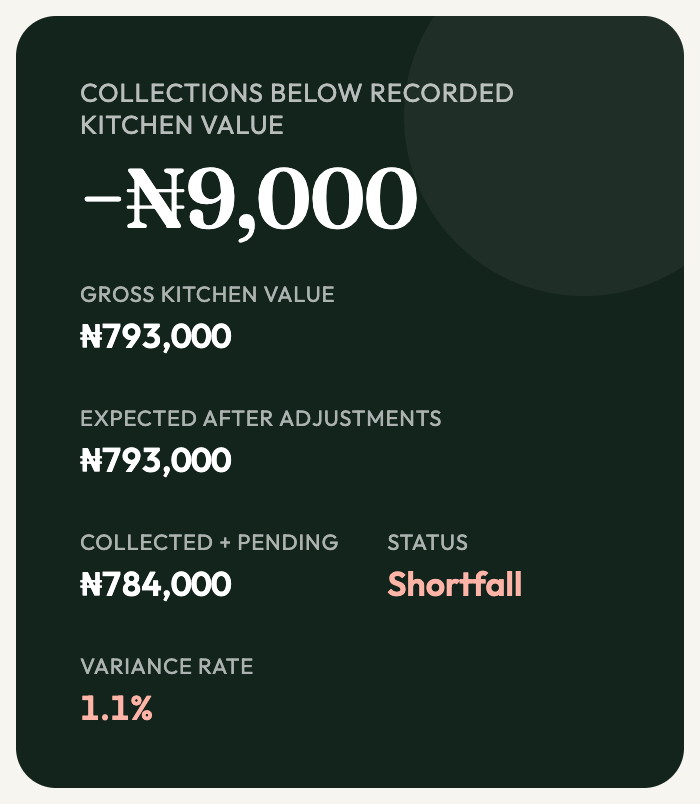 Demonstration data

Screens from the Ledgah app using a made-up restaurant. Not a real business.
How it works
What your team enters
- Once: branches, menu and prices, POS terminals, delivery apps, and when each one pays out.
- Each morning: the kitchen book (supply and returns) and each terminal's and app's total for the day.
- When money lands: the amount and the bank statement reference.
- For a difference: who is following it up, the explanation and an evidence reference.
What Ledgah works out
- What you should have taken, what your team recorded as collected, the difference and the day's verdict.
- Which payouts are still owed, when each is expected, and which are late.
- Whether each payout matches what was expected, or the provider's statement.
- An owner summary, ready to share on WhatsApp.
Ledgah doesn't connect to your bank or read statements automatically. Your team copies figures from bank statements and payout statements; Ledgah does the checking.
Free payout check
Send us any payout statement — delivery app, POS provider or bank. We'll show you what was deducted and whether it matches what you were owed. Cover account numbers and registration numbers first; we only need amounts and dates. To confirm a payout reached your bank, we'll also need the matching bank statement line, or your confirmation. How we handle what you send.
Simple pricing — per branch, per month
Choose the band that matches your branch's usual monthly sales. We review it with you once a year.
| ₦10 million or less | ₦10,000 |
| Over ₦10 million, up to ₦30 million | ₦20,000 |
| Over ₦30 million | ₦35,000 |
Start with the 30-day free trial. After that, you pay month by month, and you can stop whenever you like. Each month we send you a Paystack link covering all your branches; pay it by card, bank transfer or USSD. Nothing is charged automatically.
Founding price: half price for the first 20 businesses to start paying, on all their branches, for 12 months. After that, each branch pays the normal price for its band. Ask us how many founding places are left.
Questions owners ask
Does Ledgah connect to my bank or read my statements?
No. Your team enters figures from bank statements and payout statements, and Ledgah does the checking. Marking a payout received needs the bank statement reference.
Will it catch theft?
It shows the gap between what the kitchen book says was sold and what your team recorded as collected, for each day closed in Ledgah, and each payout not yet marked received. It can only compare what's written down: food that leaves the kitchen without going into the kitchen book won't show as a gap, and adjustments your team records, like waste or staff meals, lower what's expected, so they're worth checking. It doesn't explain a gap by itself — your team follows it up and records what they find. No one should be blamed without evidence.
Do I need special hardware?
No. Ledgah runs in the web browser on a phone, tablet or laptop. Your POS machines and bank accounts stay exactly as they are.
Do you take a percentage of my sales?
Never. You pay a flat monthly fee per branch, based on the band you choose.
Who can see my numbers?
Anyone who signs in with your business's login — today each business has one shared login — and anyone using a phone or laptop where that login is still signed in. Your records are kept in a Supabase database and in the browser on each device you use; signing out locks that copy but doesn't erase it. Other Ledgah businesses can't see your records. Ledgah's founder, who runs the database, can see them too. How we handle your data.
What happens after the free trial?
Before your 30 days are up, we'll get in touch to confirm your band and arrange your first month's payment. Nothing is charged unless you choose to pay. If you don't pay, you can still sign in, look through your history and download your records — not paying doesn't delete them.
Can I cancel, and keep my records?
Yes. You pay month by month and can stop whenever you like — just tell us. After you stop, you can still sign in, look through your history and download your records: spreadsheet (CSV) summaries of your closes and settlements, one branch at a time, plus a backup file with the full detail that Ledgah can read back in.